At the users of iGO8 all around the world, welcome on board ! You can find on this blog wallpaper pictures, colormaps, POI icons and skins to customize your favorite GPS navigator ... Leave me all your remarks, questions or suggestions at : artwork.igo8[@]gmail.com iphone apple mac
1. Added volume control (overspeed, return to the allowed speed, switching the sign of allowed speed). 2. Return to the allowed speed, now played once. 3. You can select a sound return to the allowed speed. 4. You can select the launch window. 5. Added in the "fullpack" of color scheme "GJ", and in the skin sounds files.
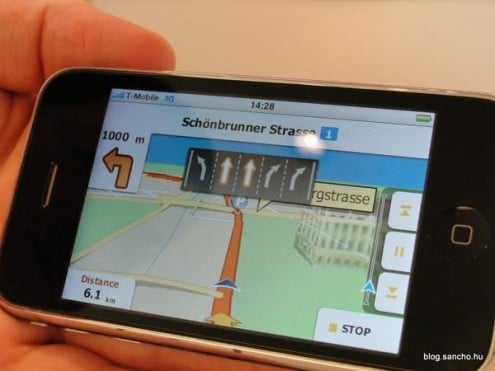
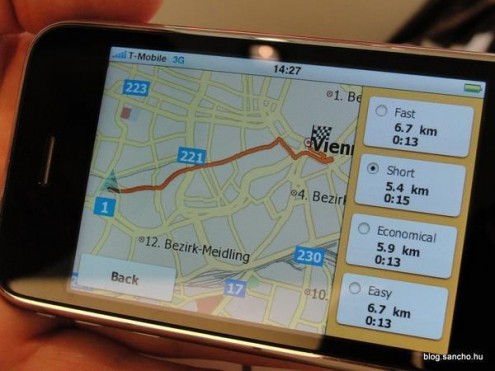
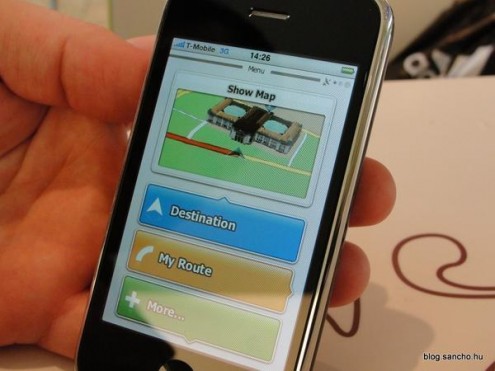
iGO My way on iPhone ... Enjoy first screenshots and videos !
Since Firmware 3.0 and the authorization by Apple to integrate voice navigation, GPS softwares continue to emerge.
It's now time for NavNGo iGO to be on the front of the stage with their application My way, soon available on the AppStore for iPhone 3G and iPhone 3GS.
Some screenshots :
And two videos :
The specificity of iGO My way compared to other navigation softwares is the view with the buildings in 3D. The graphics in the menus are simple and colorful.
The price would be around 69.99€ for European countries ...
1. Add support 3D cars. 2. Support half-patch "Map Changer" Copy files in to directories: 2a. Teleatlas -> content/map 2b. navteq -> content/map_nt 2c. Other -> content/map_ot 2d. User -> content/map_us 3. Change signpost "Standart". 4. Technical repairs.
****** 6.7p 2009.06.15 ********
1. Support half-patch "The maximum speed on the last kilometer." 2. Support themechanger with manual change of the weather. 3. Support half-patch "advanced radar". Pose instead half-patch Spidkam. 4. The new configuration of "What to display on the top line." Toggle "following the street" and "destination". The same goes a long press on the top bar. 5. When switching on/off offroad from now a dialogue with three buttons: "replan", "delete", "Cancel". New (first) button, when pressed, making the route from the current status of GPS to the old end point of the line, which moved. 6. New button in the short menu - "Color Profiles". 7. Added the sound settings at startup and exit from the iGO. Name of sound file is written to the switch in the settings. 8. Technical repairs.
****** 6.6p 2009.05.18 ********
1. Corrections to the exact height of tripkomp (become dependent on the settings). 2. Instead, check box on the left at the bottom of the cab - a vehicle icon. Click it - quick menu change the vehicle, including offroad (aircraft). 3. Another type of signpost - the white arrow downward. 4. Sound for changes of speed limit. 5. Purpose of Action for the quick buttons adapted from the switch to the list. Also, long pressing the specific button you can quickly change it. 6. Dial the remaining route while loading iGO. 7. Technical repairs.
New update of the well known iGO8 Ultra skin by Linknet ... (supported resolutions are 320x240, 240x320, 640x480 and 480x640 only)
Changes in 6.0.22 version:
Fully compatible with the following versions:
iGO8 PDA Version 8.3.2.64029 dated 7th November 2008
iGO8 PDA Version 8.3.2.73871 dated 25th January 2009
iGO8 PDA Version 8.3.2.87762 dated 27th April 2009
iGO8 PNA Version 8.3.2.64873 dated 13th November 2008
Fixed: The "Settings ► Pop-Up Info Settings ► Display Visible POI's Only" value was being used globally for all other POI searches. This setting is now restricted to the "Pop-Up Info Panel" only and doesn't affect other POI searches.
Language files updated for 6.0.22 version ! - German PDA or PNA - Hungarian PDA or PNA
The existing functions and appearance of the author Dimka was gradually added and modified
+ Tuning of the entire code (any resolution) + Modifying the location of some data in the cockpit (any resolution) + Adding a new option in settings "TomSoft" for OFF / ON additional information about TMC (any resolution) (thanks Lakvíkovi) + Correction of location of all components in the cockpit (any resolution) + Add your own transparency options lower data sheet on the roll (400x240) + Adding more seats in the cockpit on the bottom bar, where you can begin to plan a route (400x240)
Installation: * Unzip the zip. * You will be two folders and GFX SCHEMES * GFX folder copy / paste within the iGO8 folder, replace the Yes. * The contents of the folder SCHEMES add iGO8/CONTENT/SCHEME * Clear the Save folder. * Igo choose from the background you like.
Enjoy Spagna schemes ! Many thanks to Spagna for these nice schemes ...
Download the link and then register Uploaded.to Premium-Account for 1 Month. - just 5.99 Euro
The existing functions and appearance of the author Dimka was gradually added and modified
+ Larger Font data for navigation + Back colored arrows for maneuvers + Digital tachometers are SpeedLimitem, including radar and night mode Digital + hours, including night mode (in both resolutions) + Back red-green arrows on the lanes (in both resolutions) + Back functional option to view or not shown in the background šipkama with maneuvers + Option on / off status indication including "Auto. Recalculation of route" + Longclick + Option on / off indication of the state, including "alert on radar" + Longclick + Added ability to remove other transit point to one LongClick (LongClick maneuvers on the arrow to be removed first added transit point) + Added ability to optionally show the icon for radar and automatic conversion + Added ability to optionally display a classic compass needle + In the menu "Search" added the option to navigate directly to 1 and 2 Favorite targets + Added ability to navigate to the objective, the passage or continue Favorites and History + Added ability to separately adjustable tilt the map in the direction signs + Adjustment function radars + Fast menu navigation and route planning + Added the option in one of the variable data fields display the route + Added color arrows in the information board + Added information about the position in the GPS clock + Patch to paint arrows on the directional signs + Added count of
HP IPAQ 31x owners can enable the 'Bluetooth for IPAQ 31x' in the menu options. This option will enable bluetooth buttons both in the main Map and Cockpit views. Such new options include buttons for the dialpad, bluetooth manager, and OFF switch. Not only that, and thanks to bitblaster, you can make POI calls to your bluetooth phone directly from IGO. 31x owners must now download the 'normal' skin and enable the advanced bluetooth options in settings - menu. This needs to be enabled only once. You now have an invisible button on the map (lower right corner) which will turn bluetooth ON and show the Bluetooth Manager. In the cockpit view, there is a new button to show the Bluetooth Dial Pad. A big thanks goes to bitblaster for coding the bluetooth applications.
Highlights:
1. Speedcam Voices 2. HP IPAQ 31x Bluetooth functions - Bluetooth Manager, Dial pad, POI calling directly from within iGO. 3. POI Pop-up 4. Transparency settings 5. Each cockpit field has 21 options and configurable in both cruise and nav modes. 6. Circular Compass on map can be turned off. 7. Circular compass moves over to the right when overspeed/speedcam icon appears. Compass can still be turned off however. 8. Cockpit fields can have either a light or dark background. Dark background always shown in night mode. 9. Dark background of Cockpit fields allows for either "VFD Blue", "Orange LED", or "White Glow" colors of the field labels. 10. Overspeed warnings now appear either whenever speeding or whenever available. Select the option in Settings--->Warnings. 11. Current Speed in Red when speeding, provided 'Current Speed' is selected as one of the cockpit fields. Feature can be turned off however. 12. The map scale can now be turned off while the 2D navigation map is visible.
Download Instructions: Place the *.zip in "IGO8\content\skin" directory. In order to use the advanced bluetooth functions directly in IGO8, you will need the bluetooth files in the second download below. If you have already used a previous bluetooth version of this skin, you DO NOT need these files, as you already have them.
Enjoy Kikker 3.2 Skin (Bluetooth version now incorporated into the 'normal skin'. See above.)
Files to enable bluetooth options for the IPAQ 31x. (Not necessary if you have used a previous version of this skin!) and many thanks to Kikker for sharing his nice work ;-)
Nice skin by Bidru51 for european users with iGO8 v8.3.2.xxxxx
Features in v5.0f - Compatible with igo-Weather v1.3.6 by Titidom - Extension of No exit roundabouts colored in yellow - Update of speed limits in rain for Belgium - Fix the size of buttons in the menus in 320x240
Enjoy Bidru51 Skin v5.0f ! and many thanks to Bidru for his nice skin ...
New update of the well known iGO8 Ultra skin by Linknet ... (supported resolutions are 320x240, 240x320, 640x480 and 480x640 only)
Changes in 6.0.21 version:
Fully compatible with the following versions:
iGO8 PDA Version 8.3.2.64029 dated 7th November 2008.
iGO8 PNA Version 8.3.2.64873 dated 13th November 2008.
Added new lane arrows and red crosses to the signpost information panels making it easier to determine the correct lane(s) to take (see the screenshots page).
Removed the previous signpost coloured backgrounds since these didn't display correctly if the "[feature] signpost_coloring=1" setting was used in the sys.txt file.
Added new lane information arrows and red crosses to match those in the signpost information panels.
Language files updated for 6.0.13 version ! - German PDA or PNA - French PDA or PNA - Hungarian PDA or PNA
artwork-iGO8.blogspot.com is in no way affiliated with NavNGo Inc. All trademarks and copyrights are the property of their respective owners. skin skins iGO 8 iGO8 NavNGo NavNGo8 icon icons POI POIs wallpaper wallpapers background backgrounds map maps colormap colormaps voice voices speedcam warning My Way iGO2006 2006 2006+ portrait landscape 240 320 400 480 640 272 TomTom
1. To apply a new wallpaper in iGO8, download the wallpaper of your choice on this blog (click on the picture to obtain directly the full resolution .bmp file) and put it in the folder ui_igo8/240_320/background on your memory card (if this folder doesn't exist just create it !) If you prefer landscape mode, just rotate the picture and put it in the folder ui_igo8/320_240/background
2. To include a new skin, put the skin file (.zip) in the folder content/skin
3.To change the 3D colormap , just put the dayheightcolormap.bmp or nightheightcolormap.bmp file in the folder ui_igo8/common




 Create new layers and objects


